ScreenPaperShow Full HD 1080p
Every day a new artwork on your desktop.
ScreenPaperShow places beautiful Full HD wallpapers on your Windows PC and also allows you to print coloring pages or save them as PDFs.
One app, in the style of an Art Deco poster. For Windows 10 and newer. Version 1.0.1. [DEMO]

Choose the Version That Fits You
ScreenPaperShow – Free [DEMO] - ( latest version 1. 0. 1 ) 81 MB
-
Price: Free
-
Playtime: 30-minute full feature preview
-
Wallpapers: Access to 2 sample wallpapers
-
Coloring Pages: Access to 2 sample coloring pages
-
Store Access: Direct access to purchase the full version and extra content from the website
-
Goal: Try out the app and test all features on your PC before buying
ScreenPaperShow – Premium [ FULL VERSION ] - ( latest version 1. 0. 1 ) 280 MB
-
Price: €3.95 (One-time payment, no subscription)
-
Playtime: Unlimited continuous access
-
Wallpaper Collection: 80+ High-Quality Wallpapers (plus add your own custom wallpapers)
-
Coloring Pages: 30+ Printable Coloring Pages (print or save as PDF)
-
Language Support: Multi-language interface + (English, Dutch, German, French, Japanese, Korean & Chinese)
-
Display & Control: Full display settings adjustment + convenient System Tray controls
-
Extra Features: Preview mode & Favorites list
-
Daily Artwork: Automatic daily rotation of new artwork on your desktop
-
Watermark Free: All downloads and displays are 100% watermark-free
-
Updates: Includes all future updates and feature enhancements
click the button for downloading ScreenPaperShow v 1.0.1 [DEMO] 81 Mb
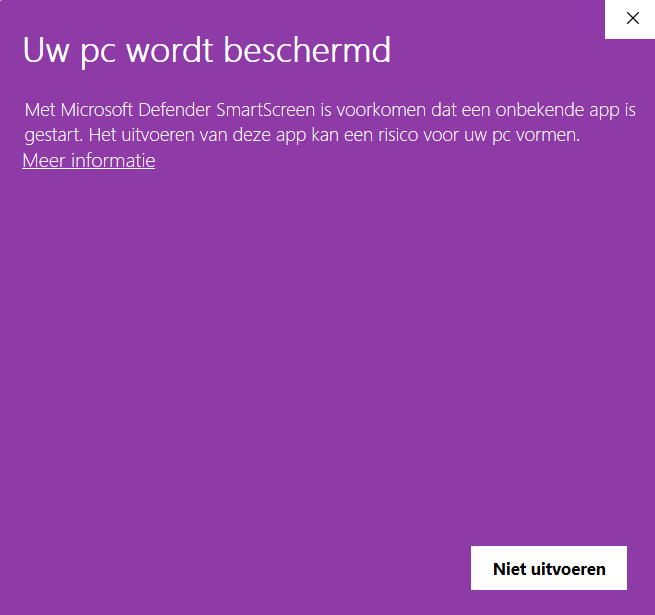
Windows warning? Need more info ? go to the section below: > Important Note for Windows Users (Smart Screen Warning)
When launching for the first time, Windows may report that the publisher is unknown. This is because the app has not yet been signed with a paid certificate.
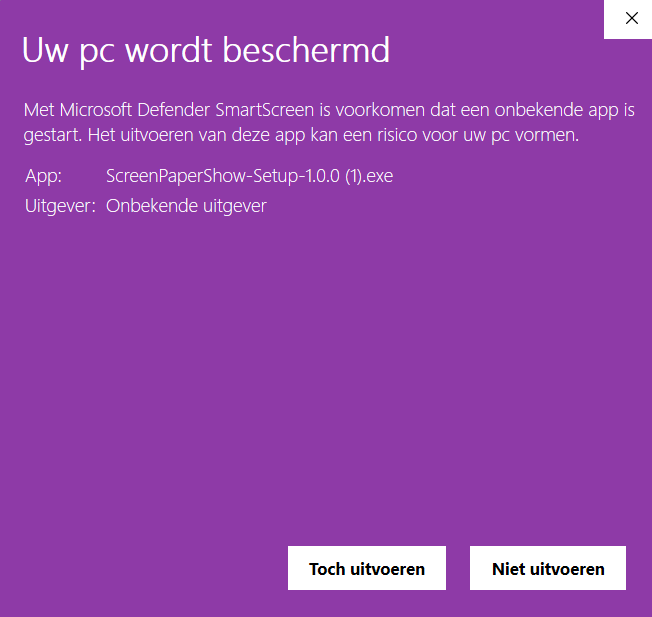
Click on More info and then on Run anyway. Your browser may also state that the file is not commonly downloaded: in that case, choose Keep.
Premium | Full-access | ScreenPaperShow version 1.0.1 Premium . ( 280 MB )
Premium version 1.0.1.
-
Sale!
 ScreenPaperShow version 1.0.1 €3.95
€7.95
What the app does for you:
Before you begin, you will be greeted by an assistant styled in the same colors as the app. It explains what the app does and asks for your agreement to the terms, keeping everything seamlessly integrated within the app rather than opening separate Windows screens.
Choose a picture, click once, and your desktop is refreshed. That is all there is to it, but there is quite a bit going on under the hood.
ScreenPaperShow - Full HD 1080p Edition is a versatile Windows application specially designed to bring together digital art, wallpapers, and interactive coloring pages on your PC.
The application combines a range of very useful features into one clean and intuitive interface:
-
Wallpapers & Coloring Pages: Easily switch between a collection of high-resolution wallpapers and interactive coloring pages.
-
Dedicated Coloring Tools: You can not only view coloring pages, but also print them directly from the program or save them as a PDF to color them on paper or digitally.
-
Favorites & Custom Content: Mark your favorite images and even add your own coloring pages (+ Add Custom Coloring Page) to load them into the app.
-
Convenient Search & Navigation: Featuring a built-in search bar (Ctrl+F), hotkeys (such as the spacebar for a quick preview), and navigation buttons to swiftly browse through the collection.
-
Direct Webshop Integration: Buttons for the Website and Terms are located at the top bar, seamlessly connecting the software to the webshop (screenpaper.store).
It is a powerful, lightweight software tool that offers relaxation through coloring pages while serving as a practical utility to manage your desktop and digital images.
Wallpapers in Full HD
Images of 1920x1080 in six styles: Art Deco / Neo-Deco, Abstract / Minimal, Animals, Anime, Landscape, and Fantasy. Place them on your desktop or lock screen with a single click.
Automatic switching
Let your desktop change automatically every 24 hours or every week, using all wallpapers or only your favorites.
Your own images
Add your own images with a custom title and category. The app saves a copy, so you can safely move the original file.
Important Note for Windows Users (Smart Screen Warning)
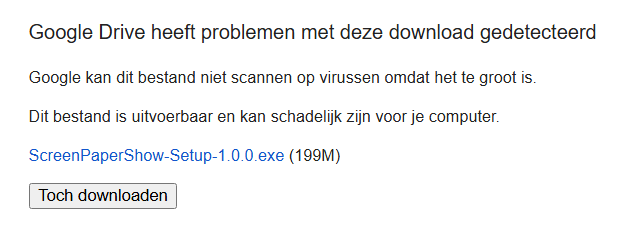
When downloading or opening the file, you may see a message from Google Drive saying "Google Drive has detected issues with this download" or a purple Windows popup stating "Windows protected your PC". Please don't worry—this is completely normal and the software is 100% safe.
Why does this happen? Because this application is independently developed and does not have an expensive digital code-signing certificate attached to it, Windows does not recognize the publisher yet. Windows automatically displays a standard safety warning for all new or uncertified executable files.
How to proceed with the installation:
-
On Google Drive, click "Download anyway".
-
When the purple Windows popup "Windows protected your PC" appears, click on "More info".
-
A new button will appear at the bottom: click "Run anyway".
The installation will now start safely and smoothly!
Two minutes after downloading and executing the file, Windows Defender will notify you that no threats have been found.

More inside impressions from the App..


Add comment
Comments